

If your Minneapolis business is moving to a new space, expanding a floor, or replacing aging wiring that keeps dropping connections, network cabling installation is the foundation every other technology decision rests on. Get it right the first time and your team works without interruption for years; get it wrong and you spend that time chasing intermittent outages and calling technicians back for rework.
For a deeper look at planning, budgeting, and selecting the right infrastructure for your project, our network cabling installation guide covers everything Minneapolis business owners need to know before hiring a contractor.
This guide walks Minneapolis business owners and IT managers through every major step of a commercial cabling project, from the initial site survey through final certification testing, with timeline estimates, prerequisite items, and the common pitfalls that cause cost overruns and delays in the Minneapolis-St. Paul metro.
Key takeaways from this article:
- A site survey before any wire is pulled is the single most important step – skipping it is the leading cause of missed drops and budget overruns on Minneapolis cabling projects.
- Cat6 handles most office workloads today, but Cat6A and fiber optic backbones are worth the modest upfront cost if your space will add users, cameras, or high-density Wi-Fi within three years.
- Downtown Minneapolis and multi-tenant buildings require early coordination with property management for dock access, elevator reservations, and quiet-hours scheduling – plan for at least two weeks of lead time.
- Fluke or OTDR certification testing is not optional on a commercial project; without a documented test report, you have no proof the cabling will perform to spec when a problem surfaces later.
Step 1 – Schedule a Site Survey and Needs Assessment
A qualified Minneapolis-area low-voltage contractor will walk your space, review existing floor plans, and map out the number of data drops, telecommunications room locations, and equipment positions before a single cable is ordered. This visit also captures bandwidth requirements, the number of wireless access points planned, and any conduit or pathway limitations that will affect the installation route.
The site survey typically takes one to three hours for a standard commercial floor and produces a scope document the contractor uses to price the project accurately. Skipping this step and working from a rough square footage estimate is the most common reason Minneapolis businesses receive change orders mid-project.
Prerequisite items for this step include current or as-built floor plans, a count of workstations and conference rooms, and confirmation of where the main distribution frame or server room will sit. Common pitfall: tenants sometimes forget to include planned growth in headcount, which means the new cabling is already undersized on move-in day.
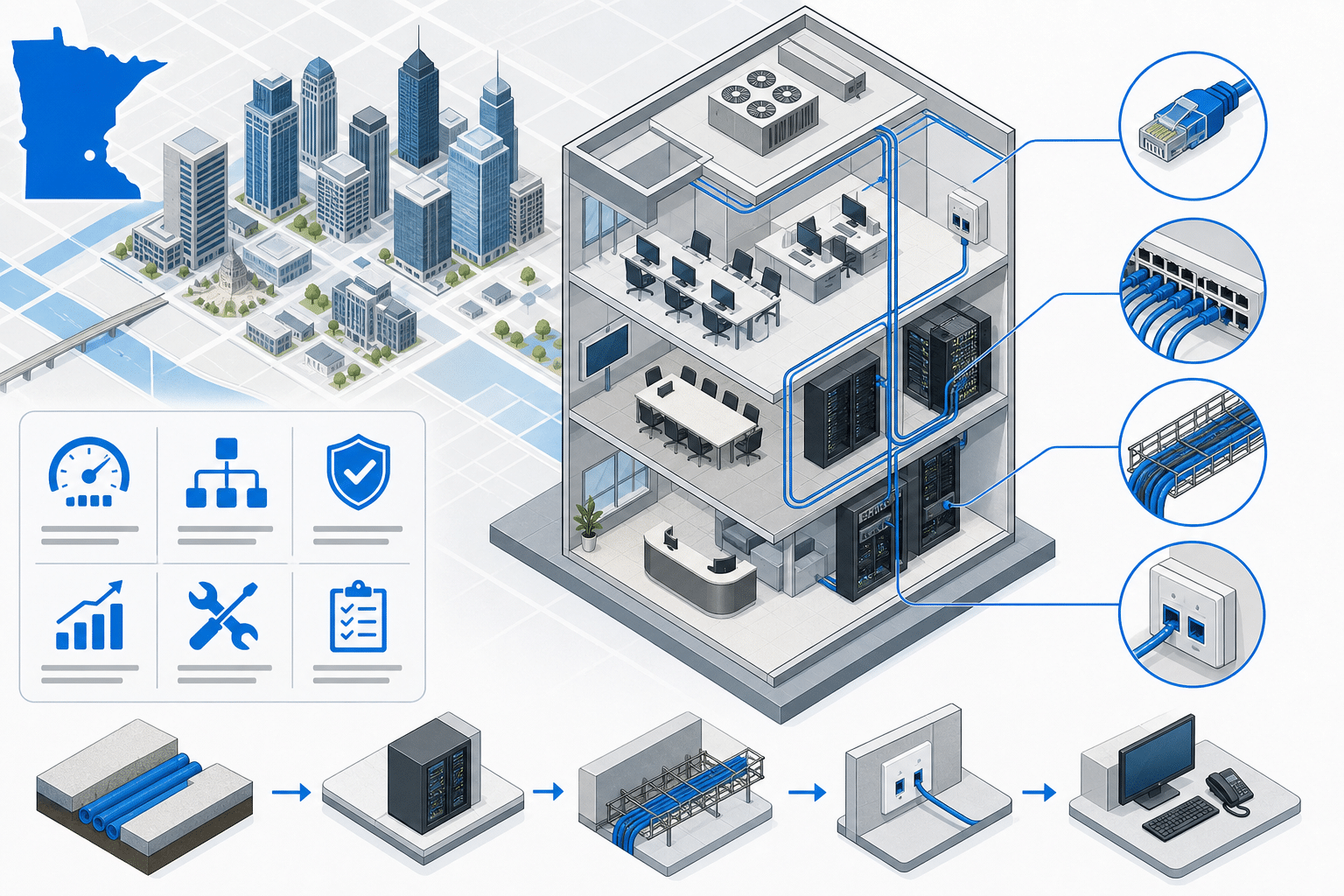
Network Cabling Installation Checklist for Minneapolis Businesses
- ✓Step 1 – Site survey and needs assessment – Engage a Minneapolis low-voltage contractor to walk the space, confirm drop count, equipment locations, and bandwidth needs before scheduling installation.
- ✓Step 2 – Structured cabling design – Have a BICSI-trained designer produce a layout specifying cable category (Cat5e/Cat6/Cat6A/fiber), rack configuration, and pathway routing to support current and future growth.
- ✓Step 3 – Cable type selection – Choose Cat6 as the standard for horizontal office runs, Cat6A for high-density Wi-Fi and long PoE runs, and multimode fiber for backbone and inter-building links.
- ✓Step 4 – Building access coordination – Secure written approval from property management for dock access, elevator reservations, drilling permits, and after-hours work at least two weeks before crew mobilization.
- ✓Step 5 – Installation, labeling, and termination – Pull and terminate all cable runs per TIA-568, install racks and patch panels, and label every jack and patch panel port with a consistent identifier approved by the client IT team.
- ✓Step 6 – Fluke or OTDR certification testing – Test every copper run with a Fluke DSX analyzer and every fiber run with an OTDR; require a passing test report and as-built drawings before accepting project completion.
- ✓Typical per-drop cost range (Minneapolis, Cat6) – Approximately 125 to 250 dollars per drop, depending on building construction type, ceiling height, and conduit requirements.
- ✓Common certification standard – TIA-568-C.2 for copper (Cat6/Cat6A) and TIA-568-C.3 for fiber optic cabling installations.
Data sourced from Minneapolis-area low-voltage contractor published service descriptions and BICSI cabling standards guidance. Pricing ranges are estimates for the Minneapolis-St. Paul metro as of 2024-2025.
Step 2 – Design a Structured Cabling Plan for Current and Future Growth
After the survey, a BICSI-trained designer creates a structured cabling layout that maps every horizontal run, each telecommunications room, and the backbone pathways that tie floors or buildings together. The design specifies cable category, conduit sizing, rack layout, and the number of patch panel ports needed today and at projected growth.
Minneapolis providers with BICSI-certified staff treat this design phase as a separate deliverable, not a free sketch on a napkin, because the design document becomes the install guide and the as-built baseline. A solid design also lets you get competitive bids from multiple contractors, since every bidder is quoting the same scope.
Timeline estimate for this phase is typically three to seven business days for a single-floor office and up to three weeks for a multi-floor or multi-building campus. Common pitfall: designs that ignore future wireless access point density leave installers without conduit sleeves or ceiling pathways, which forces expensive rework when Wi-Fi is upgraded.
Prerequisite items include the completed site survey document, confirmed equipment vendor specs for switches and patch panels, and written approval from building management on any core drilling or conduit attachment points.
Step 3 – Select the Right Low-Voltage Cabling Types for Your Use Case
Cat5e remains a budget-friendly option for voice-only runs and low-density data in smaller Minneapolis offices, but Cat6 has become the practical standard for new commercial installations because it supports 10 Gbps at shorter distances and handles Power over Ethernet (PoE) for IP phones, cameras, and access points without the heat buildup that stresses Cat5e bundles. Cat6A extends 10 Gbps to the full 100-meter channel and is the right call for high-density Wi-Fi 6 environments or any run that feeds a data center switch.
Fiber optic cabling – typically multimode OM3 or OM4 – serves backbone runs between telecommunications rooms, between floors, and between buildings on a campus. Minneapolis businesses that run video surveillance over long distances or connect to a co-location facility in the Twin Cities metro almost always need at least a fiber backbone even if their horizontal runs stay copper.
Common pitfall: selecting Cat5e to save a few dollars per drop and then discovering two years later that PoE++ devices cause thermal failures in tightly bundled runs. The per-drop cost difference between Cat5e and Cat6 is small enough that most Minneapolis contractors now default to Cat6 unless the client has a specific budget constraint.
Timeline estimate for material procurement is two to five business days for standard copper categories from regional distributors, and up to two weeks for specialty fiber assemblies or custom-length pre-terminated trunks during periods of supply constraint.

Step 4 – Coordinate Installation Timing with Building Access and Tenant Schedules
Multi-tenant buildings in downtown Minneapolis and the suburban office parks around the metro impose real constraints: loading dock reservations, elevator pads, freight-only hours, and quiet periods that prohibit drilling or hammering during business hours. Failing to secure these access approvals before scheduling the crew is one of the most avoidable causes of project delay.
A well-run Minneapolis cabling contractor will request a certificate of insurance, a contractor badge or escort policy, and written confirmation of permitted work hours from property management before the crew arrives. Budget at least two weeks of lead time for this coordination in a busy multi-tenant building and four to six weeks in a Class A high-rise with a formal tenant improvement process.
Timeline estimate for this coordination step depends almost entirely on how quickly property management responds. Common pitfall: contractors who book a crew day without confirmed building access end up with an idle crew on-site and a bill for lost labor time that lands on the client.
Prerequisite items include a signed contract with the cabling vendor, proof of liability and workers’ compensation insurance, and a confirmed move-in or go-live date that the installation must hit.
Step 5 – Install and Label All Cabling, Patch Panels, and Terminations
Installation day for a standard 50-drop Minneapolis office typically runs one to two days with a two-person crew: one technician pulling cable through ceiling pathways and walls while the other manages the telecommunications room, installs the rack, and begins terminating patch panels. Larger projects with 150 or more drops are often phased by floor or zone so tenants in occupied spaces experience minimal disruption.
Every jack at the workstation and every port on the patch panel must be labeled with a consistent identifier – a common scheme is a zone letter plus a sequential number, such as A-01 through A-48 for the first patch panel in zone A. Clear labeling is what separates a cabling plant that your IT team can manage in-house from one that requires a contractor visit every time someone moves a desk.
Common pitfall: crews that rush terminations leave cables with insufficient untwist at the punch-down, which causes near-end crosstalk failures on Cat6A that only show up during certification testing, forcing re-termination after the rack is already dressed and tied. Require your contractor to follow TIA-568 termination standards and to demonstrate compliance during the installation walk-through.
Prerequisite items include an approved cabling design drawing, rack units pre-planned in the design, and a labeling convention approved by the client’s IT team before the first cable is pulled.
Step 6 – Test, Certify, and Document All Cable Runs
Certification testing with a Fluke DSX cable analyzer (for copper) or an OTDR (for fiber) measures the actual electrical and optical performance of every run against the TIA-568 standard for the cable category installed. A passing test result confirms that the run will support the speed it was installed to deliver, and a failing result pinpoints exactly which drop needs a re-termination or a pull.
The test report and as-built documentation – a drawing that labels every drop, maps it to a patch panel port, and identifies each telecommunications room – is the deliverable that gives your IT team a working reference for every future move, add, or change. Minneapolis providers who skip this step or hand over only a verbal assurance are leaving the client with an undocumented plant that becomes a liability the first time a switch is relocated.
Timeline estimate for testing and documentation on a 50-drop copper install is typically four to eight hours; a 200-drop mixed copper-and-fiber project may take two full days. Common pitfall: clients who accept a project as complete before the test report is delivered have limited recourse if performance problems appear after the contractor has moved on to the next job.
Prerequisite items include completed terminations on all drops, access to both ends of every run simultaneously, and a client contact who can sign off on the as-built drawings before the contractor demobilizes.
Choosing the Right Network Cabling Contractor in Minneapolis
The Minneapolis-St. Paul metro has a healthy pool of low-voltage contractors, but quality varies widely . Look for BICSI membership or BICSI-certified Registered Communications Distribution Designers (RCDD) on staff, verified experience in your building type (medical office, warehouse, multi-tenant retail, and data center each have distinct requirements), and a process that includes the site survey, design, installation, and certified test report as a bundled scope rather than a la carte add-ons
.
Ask for references from similar-sized projects completed in the past 12 months and request sample test reports and as-built drawings from a completed job. A contractor who cannot produce those samples is telling you something important about how they handle documentation.
Pricing for Minneapolis commercial cabling typically ranges from roughly 125 to 250 dollars per drop for standard Cat6 horizontal runs, depending on building construction type, ceiling height, and conduit requirements. Fiber backbone pricing is quoted separately and varies based on run length and connector type.
Avoid bids that are dramatically lower than the range above without a clear explanation of what is excluded. Common exclusions that inflate final invoices include conduit, patch cables, rack hardware, and certification testing – confirm that all four are explicitly included in the scope your contractor provides.
Frequently Asked Questions
How long does a typical network cabling installation take for a Minneapolis office?
A 50-drop Cat6 installation in a single-floor Minneapolis office typically runs two to four business days from crew mobilization through certified testing. Larger projects with 200 or more drops, multiple floors, or complex fiber backbones should budget two to four weeks from signed contract to final documentation handoff.
Do I need a permit for network cabling installation in Minneapolis?
Low-voltage cabling permits in Minneapolis are required for work in most commercial buildings and are pulled by the licensed low-voltage contractor, not the tenant. Your contractor should include permit fees in the project bid and handle the inspection scheduling so you do not have to coordinate with the city directly.
What is the difference between Cat6 and Cat6A, and which one should I choose?
Cat6 supports 10 Gbps up to about 55 meters in a typical office environment, while Cat6A supports 10 Gbps for the full 100-meter channel and handles high-power PoE devices with less thermal risk in bundled runs. For most Minneapolis offices under 5,000 square feet with standard workstation layouts, Cat6 is sufficient, but any space planning for Wi-Fi 6 access points or IP camera systems at longer distances should budget for Cat6A.
Can cabling be installed in an occupied Minneapolis office without disrupting employees?
Yes, and it is done routinely. Minneapolis cabling crews commonly work in phases – completing one zone at a time, using low-noise tools during core business hours, and reserving drilling or core work for evenings or weekends per building policy.
Clear communication with your contractor about occupied-space protocols before the project starts is what keeps disruption manageable.
What should be included in the as-built documentation my contractor delivers?
A complete as-built package includes a floor plan with every drop labeled and mapped to its patch panel port, the full Fluke or OTDR test report showing a passing result for each run, and a rack elevation diagram showing how equipment is mounted in the telecommunications room. That package should be delivered in both PDF and editable formats so your IT team can update it as moves and changes happen over time.

About the author
Steve Dempsey - Owner
Steve Dempsey is the owner of Switchback Systems, a Minneapolis PBX and VOIP phone-system specialist that has supported local businesses for over 20 years across brands like Vertical, Avaya, and Nortel.
